Tracing subtab
This dialog is used to trace the closing of application windows within the
Windows operating system. In other words, you can make this program monitor
the state of all open windows, and if the windows you specify are set to close
without your authorization, you can forcefully interrupt the connection with
the current Internet Provider.
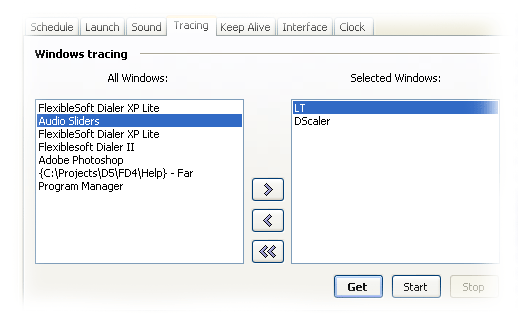
The tab consists of two lists of open windows. On the left is a list of all
windows currently open on your computer (listed by the titles found at the top
of each open window). On the right are the titles selected to be monitored by
Flexiblesoft Dialer XP.
To list all open windows, click the Get button. A list of all
open windows will appear in the left box. Click the desired title in the left
box and click the > button to move it to the right box.
To move the same title back, click the < button. If you
want to move all window titles from the right box to the left, click the <<
button.
To make Flexiblesoft Dialer XP monitor the state of your open windows, click
Start. To stop Flexiblesoft Dialer XP from watching the state
of your windows, click Stop. When all windows are closed, the
connection will be broken.
| 


